
Welcome to the new library website and library calendar.
Registration for programs has changed, and this guide will help you through the process.
To view library events click on the Events & Activities link, and choose All Events.
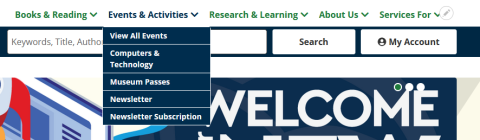
You will be presented with the new library program calendar. Search by month/week/date, use a keyword search for specific programs, or program codes, and use filters to limit program listings.
Hint* Search the keyword field with the program code from the library newsletter to quickly find your program.

Once you have found your program and clicked on the link, you will be presented with the program information.
The location of the program, time and event details are all visible on the left, and middle of the page.
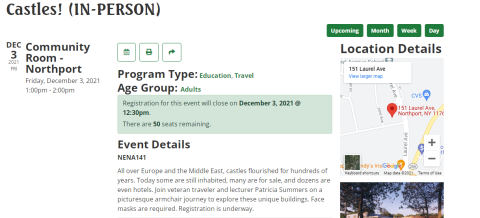
Registration information can be found below the program information.
Programs requiring a library card.
Patrons will enter their library barcode and password. If you have forgotten your password, you can reset the password using this link, which will send a reset request to your email account.
https://search.livebrary.com/pinreset
Once you enter your barcode and password, the registration information will automatically be filled.
Programs open to all.
Programs that do not require a library card can be filled in manually, entering your name and contact information on the appropriate fields.
Registration confirmation.
Once you have registered for a program you will receive an email confirmation with the relevant program details.